
Quick Start
This guide gets you from zero to a running Greentic digital worker in a few minutes. The fastest path is to launch one of the published demos from the greentic-demo catalog — every demo uses the same three-step flow.
Prerequisites
Abschnitt betitelt „Prerequisites“Before you begin, ensure you have:
gtcCLI installed — see Installation- Rust 1.95 or later (required for
cargo binstall gtcand source builds) - A public URL for webhook providers (e.g.
ngrokorcloudflared) — not required for the WebChat-only path - An LLM backend: either use OpenAI with an API key from https://platform.openai.com/, or use Ollama locally by setting the setup answers to
http://localhost:<ollama_port>/v1, choosing a model fromollama listor one you install withollama pull, and entering any value in the API key field
Launch the deep research demo
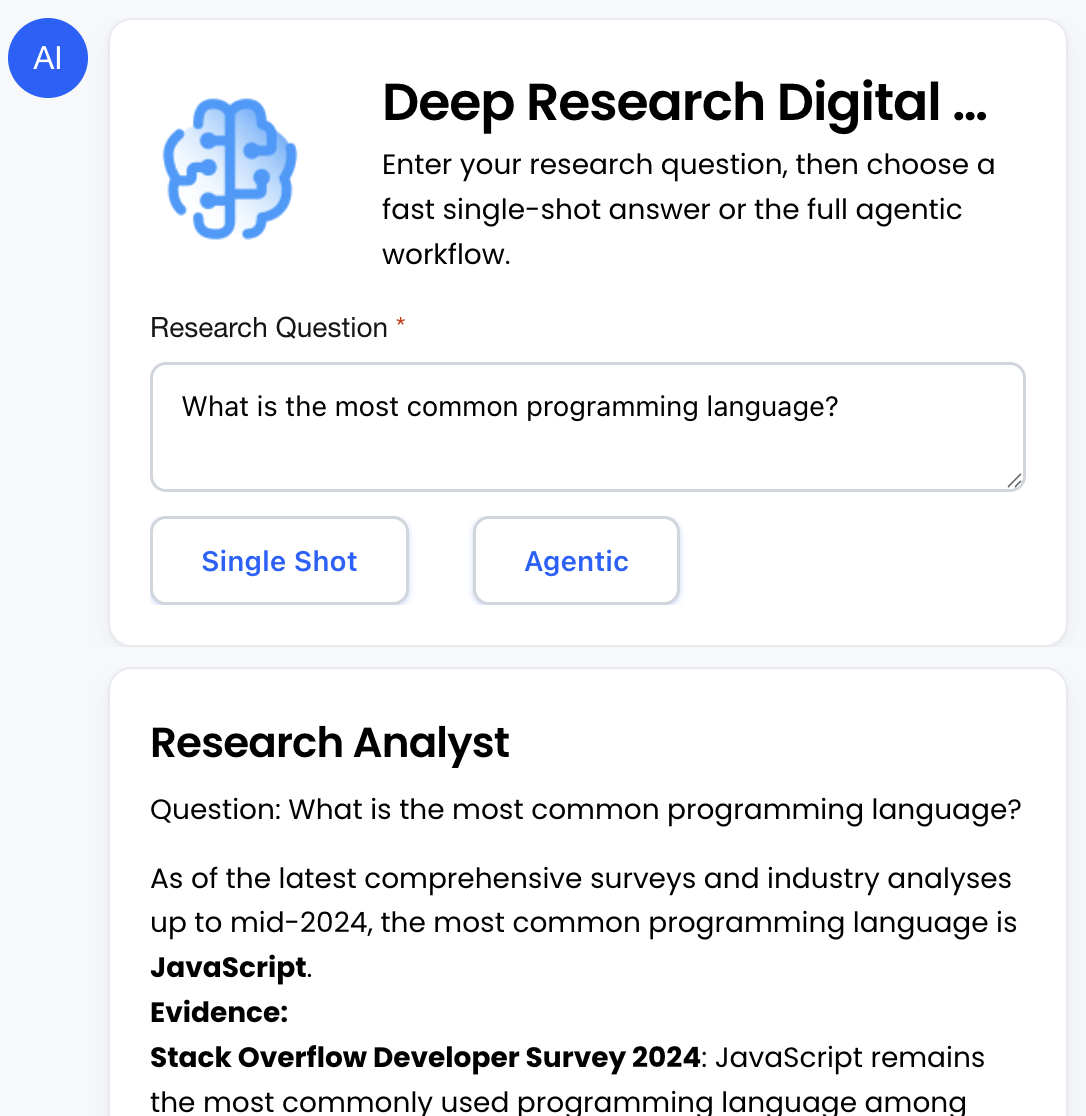
Abschnitt betitelt „Launch the deep research demo“The deep-research-demo bundle is a better first look at what a Greentic digital worker can do. It gives you a WebChat research assistant with two execution modes:
- Single Shot - Ask a question and let one research analyst produce a fast answer.
- Agentic - Route the same question through a research planner and analyst, showing how workers can collaborate across multiple flow steps.
-
Create the bundle from the published create-answers document:
Terminal-Fenster gtc wizard --answers https://github.com/greenticai/greentic-demo/releases/latest/download/deep-research-demo-create-answers.jsonThe wizard downloads the research demo pack, resolves capability dependencies (e.g. it pulls in
state-memoryautomatically because the WebChat provider needsgreentic:state/state-store), and writes a local bundle directory. -
Configure providers with the published setup-answers document:
Terminal-Fenster gtc setup ./deep-research-demo-bundle --answers https://github.com/greenticai/greentic-demo/releases/latest/download/deep-research-demo-setup-answers.jsonSetup auto-detects the bundle’s tenant, persists secrets per provider, and validates that every required capability is satisfied. If the research analyst uses an external LLM provider, the setup answers identify which credential values must be supplied.
-
Start the runtime:
Terminal-Fenster gtc start ./deep-research-demo-bundleThe runner prints the public WebChat URL. Open it in a browser, enter a research question, then choose Single Shot for a direct analyst answer or Agentic to run the planner-and-analyst workflow.
Building your own bundle
Abschnitt betitelt „Building your own bundle“When you are ready to move beyond the published catalog, the same three commands apply — they just consume your own files instead of release URLs:
-
Create a bundle with the wizard. You can run it interactively, or generate a local answers document first and apply it after review:
Terminal-Fenster # Interactivegtc wizard# Non-interactive: generate answers without creating filesgtc wizard --dry-run --emit-answers ./my-create-answers.json# Review or edit ./my-create-answers.json, then apply itgtc wizard --answers ./my-create-answers.json -
Configure providers, again either interactively or non-interactively:
Terminal-Fenster gtc setup ./my-bundle# orgtc setup ./my-bundle --answers ./my-setup-answers.json -
Start the runtime:
Terminal-Fenster gtc start ./my-bundle
See gtc wizard and gtc setup for the full reference, including capability flags and answers-document schemas.
Multi-language and i18n
Abschnitt betitelt „Multi-language and i18n“Greentic supports multi-language workers at two levels:
- Code level - Your components can be written in any language that compiles to WebAssembly components.
- Experience level - User-facing text can be translated and selected by locale at runtime.
For a WebChat or Adaptive Card worker, translations usually live in pack or bundle assets. Greentic can store locale files such as assets/i18n/en.json and assets/i18n/de.json, then resolve the correct text from the current session, team, tenant, or global default locale. If a translated string is missing, the worker should fall back to the source language rather than failing the flow.
When you create bundles with gtc wizard, capability flags such as greentic.cap.webchat.i18n.v1 tell the tooling to scaffold locale-aware WebChat assets. For cards, use the i18n workflow to extract strings, translate them, and package the locale files with the app pack.
greentic-cards2pack extract-i18n --input ./cards --output i18n/en.jsongreentic-i18n-translator translate --langs fr,de,ja --en i18n/en.jsonSee Multi-Language and i18n for the practical Getting Started overview, then continue to i18n Overview and Cards Translation for the full workflow.
Example: Hello World Pack
Abschnitt betitelt „Example: Hello World Pack“Create a pack with a hello_world messaging flow by replaying the hosted wizard answers:
gtc wizard --answers https://docs.greentic.ai/examples/hello-world-answers.jsonThe answers document creates ./hello-world-pack, scaffolds the pack, adds flows/hello.ygtc, runs doctor, resolves the pack lock, and writes the built pack to dist/hello-world-pack.gtpack.
The generated pack contains the hello world flow alongside the scaffolded default flow:
hello-world-pack/|-- pack.yaml|-- pack.lock.cbor|-- flows/| |-- hello.ygtc| `-- main.ygtc`-- dist/ `-- hello-world-pack.gtpackBundle Structure
Abschnitt betitelt „Bundle Structure“After creating the hello world pack, create a bundle that includes it:
gtc wizard --answers https://docs.greentic.ai/examples/hello-world-bundle-answers.jsonThe answers document expects the pack artifact from the previous step at ./hello-world-pack/dist/hello-world-pack.gtpack. It creates ./hello-world-bundle, copies the pack into the bundle workspace, writes the bundle definition, and records default tenant access for the hello-world pack.
The generated bundle looks like this:
hello-world-bundle/|-- bundle.yaml|-- bundle.lock.json|-- packs/| `-- hello-world-pack.gtpack|-- tenants/| `-- default/| `-- tenant.gmap|-- resolved/| `-- default.yaml`-- state/ `-- resolved/ `-- default.yamlbundle.yaml is the source definition. It names the bundle, lists the app pack references, records the global pack mapping, and keeps extension providers, catalogs, hooks, subscriptions, capabilities, setup intent, and export intent explicit:
schema_version: 1bundle_id: hello-world-bundlebundle_name: Hello World Bundlelocale: enmode: createadvanced_setup: falseapp_packs: - ./hello-world-pack/dist/hello-world-pack.gtpackapp_pack_mappings: - reference: ./hello-world-pack/dist/hello-world-pack.gtpack scope: globalextension_providers: []remote_catalogs: []hooks: []subscriptions: []capabilities: []setup_execution_intent: falseexport_intent: falsebundle.lock.json records the resolved inputs for reproducible bundle operations. packs/ contains the copied pack artifacts used by the bundle. tenants/default/tenant.gmap controls tenant access; in this example it allows hello-world and denies everything else:
_ = forbiddenhello-world = publicNext Steps
Abschnitt betitelt „Next Steps“Now that you have a basic setup running:
- Learn about Flows - Understand flow definitions
- Configure Telegram - Set up Telegram bot
- Configure Slack - Connect to Slack workspace
- Build custom components - Create your own WASM components